Home Office
Home Office Organization Ideas for a Focused, Clutter-Free Desk
A simple, step-by-step system to organize a home office — clear the desk, corral supplies, hide the cables, and build a paper system that actually sticks.
This guide contains affiliate links; I may earn a small commission at no extra cost to you.
Clear the desk before you buy anything
The fastest home office upgrade costs nothing: take everything off the desk, wipe it down, and put back only what you actually use every day. A focused desk holds your computer, one caddy of supplies, and little else. Once you can see the surface, it’s obvious what storage you really need — and what was just clutter looking for a home.
Give supplies one home with a desk caddy
Pens, sticky notes, chargers, and the daily paper pile spread out to fill whatever space you give them. A single desk organizer caddy corrals all of it in one small footprint, which is why it’s the first thing most desks need. If you’re choosing one, the caddy, riser and cable box in the shortlist below are the three worth buying.
Lift the screen, reclaim the space beneath
A monitor riser does double duty — it raises your screen to eye level for better posture and turns the space underneath into storage for a keyboard, notebook, or a small drawer. On a small desk it’s the single highest-impact organizer you can add.
Tame the cables
Cords are what make a desk read as messy even when everything else is tidy. A cable management box hides the power strip and the tangle of adapters, and a few adhesive clips route the rest along the desk edge. Hiding the power strip does more for the look of a workspace than any single organizer.
Sort the desk drawer
Best home office organizers: the desk in three pieces
One caddy for the surface, a riser for the screen, and a box for the tangle underneath.
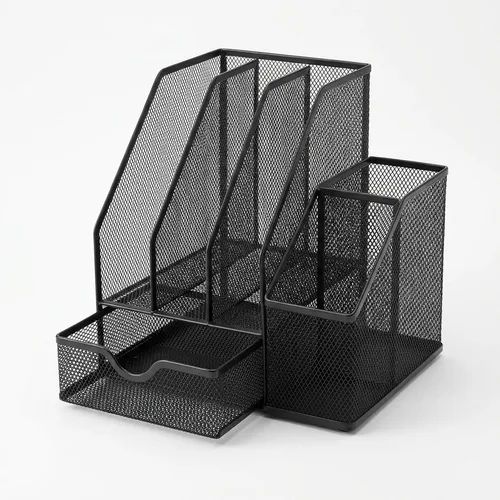
gianotter 4-Tier Desk Organizer with File Holder & Drawers
Best for Most desks
A single caddy that handles the everyday desk pile — vertical file slots for folders, a sliding drawer for clips and sticky notes, and compartments for pens.
Check price on Amazon →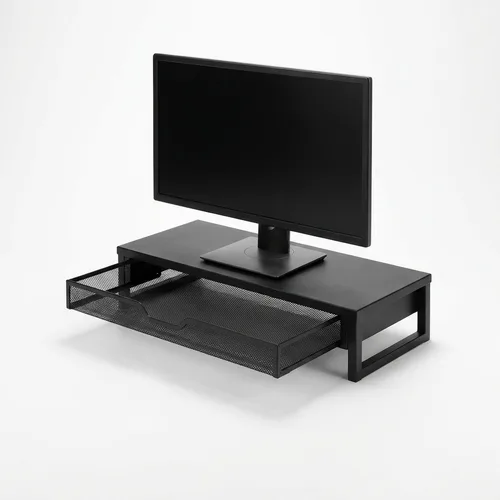
WALI Monitor Stand Riser with Storage Drawer
Best for Screen height & hidden storage
Lifts your monitor or laptop to eye level to ease neck strain, while a drawer and the space beneath swallow stationery, a keyboard, or a notebook.
Check price on Amazon →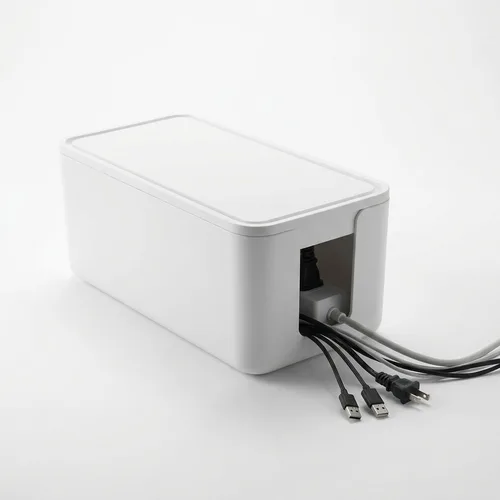
D-Line Cable Management Box & Power Strip Cover
Best for Hiding cords & power strips
A simple box that hides the power strip and cord nest under or on the desk, cutting visual clutter and keeping cables out of reach of pets and feet.
Check price on Amazon →| Pick | Best for | Material | Why it made the list |
|---|---|---|---|
| gianotter 4-Tier Desk Organizer with File Holder & Drawers | Most desks | Metal mesh | Files, drawers & pen storage in one |
| WALI Monitor Stand Riser with Storage Drawer | Screen height & hidden storage | Metal | Raises the monitor, stores underneath |
| D-Line Cable Management Box & Power Strip Cover | Hiding cords & power strips | Plastic | Conceals the power-strip tangle |
A desk drawer fills with pens, cables, and clips that slide into a jumble every time it opens. A set of interlocking drawer trays with non-slip bases gives each thing a compartment so the drawer stays sorted instead of becoming a junk drawer. The same trays work anywhere small supplies gather — the drawer organizers in my kitchen cabinet guide are the same idea at kitchen scale.
Build a paper system that sticks
Paper is the clutter that quietly rebuilds. Give it a vertical home with a tiered file sorter so active folders and bills stand upright instead of stacking, then do a 60-second weekly pass to file, shred, or recycle. Scan anything you only need a copy of and let the paper go.
Give devices a landing spot
Phones, earbuds, and watches create a daily pile of gadgets and cables. A charging dock corrals them in one place and hides the bricks, so your desk stays clear and everything is charged when you need it.
Keep it clear with a five-minute reset
Organization holds when the desk gets a quick end-of-day reset: cap the pens, square the caddy, drop devices on the dock, and clear the surface for tomorrow. A tidy desk that’s easy to reset beats a heavily organized one you can’t maintain. If your home office shares space with a closet or a spare room, the space-saving tricks in my small closet organization guide help you store backstock out of sight.
Ready to shop? Start with the desk caddy, monitor riser and cable box in the shortlist above — one for the surface, one for the screen, one for the tangle underneath.
Back to the best home office organizers →
Frequently asked questions
Where do I start organizing a home office?
Start by clearing the desk completely, then put back only what you use every day. Give supplies a single home with a desk caddy, lift the monitor to reclaim the space beneath it, and hide the cable tangle in a box. Editing the surface down to your daily-use items does more than any amount of new storage.
How do I organize a small home office or desk?
Go vertical and hidden. A monitor riser lifts the screen to eye level and turns the space underneath into storage, a single caddy holds supplies in one footprint, and a cable box gets cords off the desk. Keep only what you touch daily on the surface and store the rest in a drawer or nearby shelf.
How do I organize home office paperwork?
Give paper a vertical home so it stops stacking. A tiered file sorter keeps active folders, bills, and notepads upright and sorted, and a quick weekly pass — file, shred, or recycle — keeps the pile from rebuilding. Scan anything you only need a copy of and recycle the paper.
How do I keep cables organized on a desk?
Bundle and hide. A cable management box conceals the power strip and the nest of adapters, then adhesive clips route the remaining cords along the desk edge. Hiding the power strip removes most of the visual clutter, and a charging dock keeps phone and earbud cables from wandering.
How do I organize a home office on a budget?
Anchor the desk with two inexpensive pieces first: a supply caddy and a monitor riser. Add a cable box and a set of drawer trays as you go. You rarely need a full desk system — a couple of well-chosen organizers plus a habit of clearing the surface at the end of each day does most of the work.